What is a DNS Leak? The Ultimate Guide to Bypassing Sanctions & Preventing IP Bans
DNS leaks occur exactly when you think you are secured by a VPN, yet your operating system exposes your true identity and location to your ISP and sanctioned websites. In 2026, with the continuous upgrades to the filtering systems and DPI equipment of Iranian operators, merely changing your IP address is no longer sufficient. Crypto exchanges, freelancing platforms, and cloud services leverage this exact leakage to detect your Iranian origin, resulting in immediate account bans. The definitive solution lies in utilizing encrypted protocols like DoH and properly configuring modern clients (such as Sing-box) to securely handle DNS requests.
1. The Anatomy of a DNS Leak: When the Security Layer Crumbles
The Core Concept: How Does the DNS Protocol Work?
Let’s examine this in simple yet technical terms. DNS, or Domain Name System, acts as the internet's phonebook. When you type the address of the FoxyNet website or Binance exchange into your browser, your computer doesn't natively understand those characters. It must ask a DNS server, "Hey, what is the IP address for this site?" By default, it queries the DNS servers provided by your Internet Service Provider (ISP), such as Irancell, MCI (Hamrah-e-Aval), or TCI (Mokhaberat). Crucially, these requests are sent in entirely plain text over port 53, meaning anyone intercepting the path can clearly see your intended destination.
A Precise Technical Definition of DNS Leaks
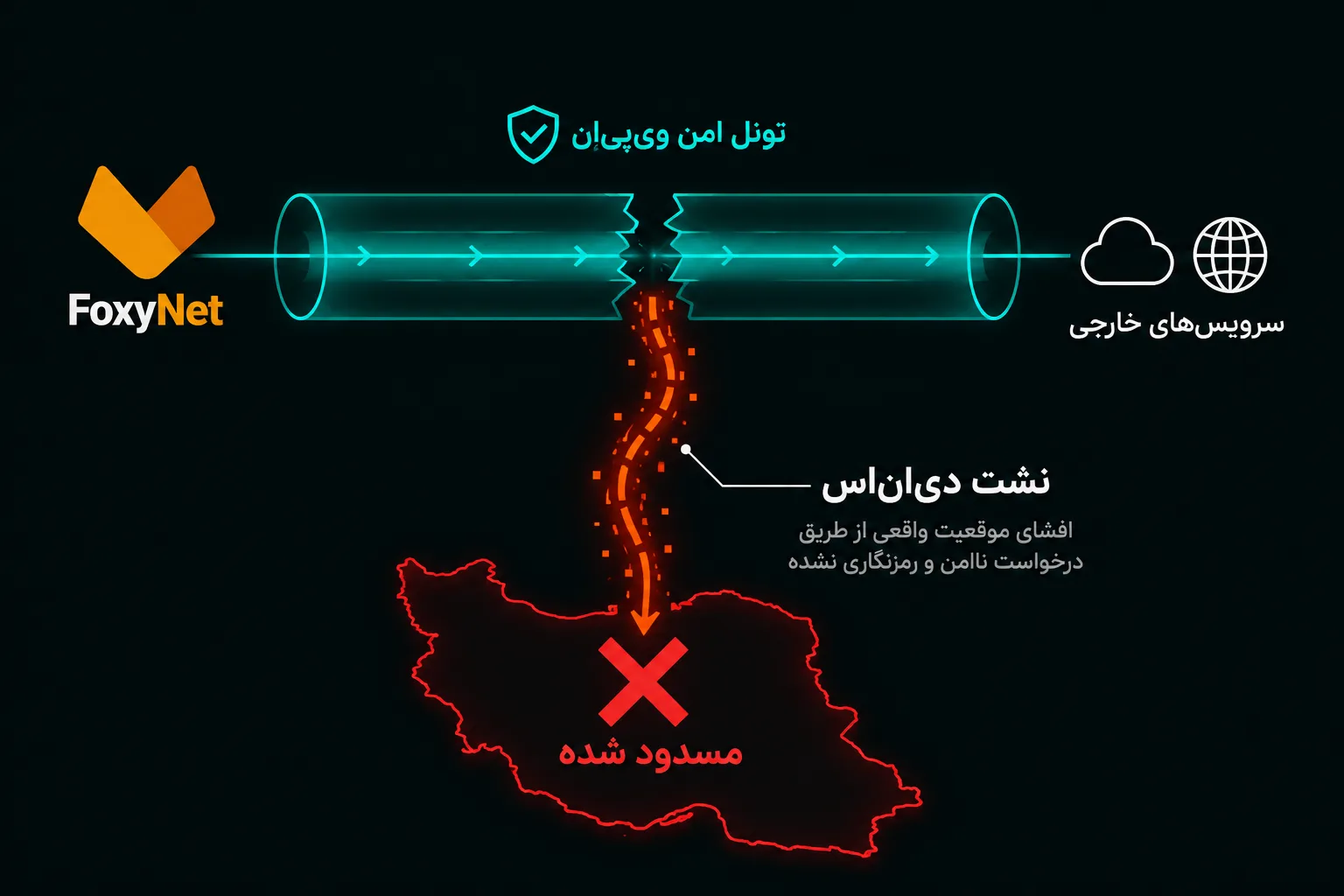
Now, assume you activate an anti-censorship tool. You expect all your data to traverse an encrypted, secure tunnel toward an external server. A DNS leak is a terrifying vulnerability that occurs when your operating system (Windows, macOS, or Android) gets confused or relies on its default settings, sending that "What is this site's IP?" query outside the secure VPN tunnel directly to domestic Iranian DNS servers. The result? The destination site (e.g., a centralized or decentralized exchange) sees your primary traffic originating from a Dutch IP address, but simultaneously receives a DNS query from your system indicating the request's root is within the Iranian infrastructure. This data contradiction is the ultimate red flag that triggers an instant ban.
Why Does the OS Leak Requests Despite an IP Change?
The primary reason traces back to operating system architectures and their inherent drive to "connect at all costs." For instance, Windows features a service called Smart Multi-Homed Name Resolution. This dictates that when Windows wants to load a website, it broadcasts the DNS request simultaneously across all available network adapters (both your primary physical network adapter connected to the modem and your virtual VPN adapter). It accepts the response from whichever server replies first.
In 2026, given the intentional disruptions and severe packet loss on international connections in Iran, domestic servers typically respond much faster. Consequently, Windows accepts the answer from the Iranian server, and boom—a DNS leak occurs. A similar scenario plays out on Android, especially when your client lacks the capability to properly handle UDP traffic or hasn't been granted the requisite OS-level permissions to fully route DNS (e.g., Android's VpnService API sometimes leaks IPv6 requests).
2. The Iranian User's Nightmare: DNS Leaks and International Account Bans
How Do Foreign Platforms (Exchanges, AI, Cloud Services) Discover Our True Identity?
Many users believe that as long as a "What is my IP" website displays a location in Germany or Finland, their security is absolute. However, in 2026, fraud prevention and risk management algorithms on platforms like Binance, OpenAI, Stripe, or AWS operate far more intelligently than a basic IP check.
When you log into an exchange, their security systems evaluate your IP address alongside the IP of your DNS Resolver. If you log in with a Frankfurt IP, but your DNS request is registered through an ASN (Autonomous System Number) belonging to the Telecommunication Infrastructure Company of Iran (TIC) or MCI, a glaring mismatch occurs. Identity detection systems immediately recognize that your traffic is proxied, and due to strict financial sanctions, your account and assets are banned in a fraction of a second.
Why Browser Location Spoofing is Insufficient for Bypassing Sanctions
Relying on browser extensions (proxy plugins) is one of the most significant security traps for Iranian users. These extensions typically only tunnel TCP traffic on ports 80 and 443 (web traffic) for that specific browser. In this scenario, DNS requests—which natively operate on the UDP protocol over port 53—easily leak out of the extension and are routed through your primary internet connection. Furthermore, WebRTC technology within browsers can establish direct communication with local DNS servers regardless of your proxy extension, exposing your true IP. For sensitive platforms, a browser proxy is akin to a locked door in a house where all the windows are left wide open.
Analyzing Real-World Scenarios: Packet Diversion and Leak Mechanics in Windows and Android
In the latest iterations of Windows 11 (2026 updates), the OS aggressively utilizes local caches and all network adapters simultaneously to accelerate web browsing. If your anti-censorship tool fails to assign the highest priority (Metric) to the virtual network adapter (TUN), Windows essentially diverts DNS packets back to your Wi-Fi or LAN adapter. On mobile devices (particularly Android 15 and iOS 18), if the network slows down or the VPN tunnel experiences packet loss, the OS automatically attempts to route requests via cellular data (outside the tunnel) to prevent internet disconnection. The direct consequence of this "fail-safe" is a catastrophic DNS leak.
3. Analyzing the Filtering Behavior of Iranian ISPs in 2026
DNS Spoofing and DNS Hijacking Techniques on MCI, Irancell, and TCI Networks
Iranian ISPs no longer restrict themselves to merely blocking IP addresses. In 2026, DNS Spoofing and DNS Hijacking constitute primary layers of Iran's filtering apparatus. When you attempt to connect to YouTube while suffering from a DNS leak, filtering equipment deployed at the ISP level intercepts your request mid-air. Instead of returning YouTube's actual IP, they inject a fake IP (such as the Peivandha block page or a 10.10.x.x blackhole) back to your system. This means that even if you deploy the most advanced configurations, a DNS leak will terminate your connection during the initial handshake layer.
Deep Packet Inspection (DPI) Surveillance and Intentional Throttling on Port 53
DPI (Deep Packet Inspection) hardware within the infrastructure network has become hyper-sensitive to port 53. Under the new filtering algorithms, if your DNS traffic is unencrypted (plain text) and specific keywords are detected, or if the system flags anomalous query patterns, your entire traffic stream is disrupted. ISPs like MCI (Hamrah-e-Aval) enforce aggressive throttling and severe packet loss on port 53, causing DNS requests to time out and completely disabling your client connection.
The IPv6 Challenge in Iran's Cellular Networks and Its Role in Amplifying DNS Leaks
One of the most critical and destructive technical shifts in recent years (late 2025 into 2026) is the widespread deployment of the IPv6 protocol across Irancell and MCI networks (Dual-Stack). The core issue? Many legacy tunneling tools and standard clients are engineered exclusively for IPv4 routing. When you connect to mobile data via your smartphone, the OS obtains both an IPv4 and an IPv6 address. Because your VPN has not established a tunnel for IPv6, all traffic and DNS requests associated with IPv6 leak transparently and entirely unprotected into the Iranian internet infrastructure! This massive vulnerability is currently the leading cause of users' identities being compromised on social networks and exchanges, entirely without their knowledge.
4. Definitive Technical Solutions for Total DNS Leak Prevention
Step 1: Migrating to Secure Protocols: DoH (DNS over HTTPS) and DoT (DNS over TLS)
As previously established, port 53 is fundamentally compromised in Iran and heavily monitored by filtering systems. You must abandon standard DNS and transition to DoH or DoT. These protocols encapsulate the "What is this site's IP?" query within an encryption layer identical to HTTPS traffic. Consequently, as your data navigates the Iranian infrastructure, ISP DPI equipment observes only generic, obfuscated web traffic and remains oblivious to the fact that you are transmitting DNS requests. You must activate the Secure DNS setting within your clients (like v2rayNG or NekoBox) and browsers, substituting default servers with highly reputable alternatives like Cloudflare (1.1.1.1) or Google.
Step 2: Advanced Sing-box and V2Ray Core Configuration (The FakeIP Technique Against Sniffing)
In 2026, the most robust and elegant solution for modern clients like Sing-box is the implementation of the FakeIP capability. How does this technique operate? When your operating system issues a DNS request, the VPN client instantly returns a dummy, reserved IP address (e.g., from the 198.18.0.0 range). This effectively tricks the OS, forcing it to seamlessly route the traffic into the secure tunnel. Subsequently, the client core independently queries the actual external destination server for the true IP address. This yields two massive advantages: it significantly accelerates website loading speeds (by eliminating one DNS ping from the user's side) and entirely eradicates the possibility of packets leaking into the hands of Iranian servers.
Step 3: Modifying Windows Settings and Disabling Smart Multi-Homed Name Resolution
Recall how Windows' built-in features undermine your security and induce leaks. To resolve this, you must intervene and disable this intrusive behavior via Group Policy. Search for "Edit group policy" in Windows, then navigate to Computer Configuration > Administrative Templates > Network > DNS Client. Locate the policy named Turn off smart multi-homed name resolution, click on it, set it to Enabled, and restart your system. This forces Windows to exclusively utilize your virtual VPN network adapter, preventing it from indiscriminately broadcasting requests.
5. The 2026 DNS Health Assessment Checklist and Tools
Identifying Reliable Leak Test Websites and Interpreting Suspicious Results
After applying your configurations and settings, do not blindly log into your Binance or freelancer accounts! You must conduct rigorous testing to guarantee your security. Authoritative sites like dnsleaktest.com or browserleaks.com/dns are engineered specifically for this purpose. Upon visiting, you must execute the Extended or deep test. The resulting output is a list of servers. If you detect even a single server bearing the name of an Iranian operator, a domestic datacenter (such as Asiatech, Afranet, MobinNet, etc.), or the Iranian flag, you are actively leaking and remain highly vulnerable. For a truly secure connection, every server on that list must correlate with the country of your VPN server, or at the very least, reflect global Cloudflare or Google servers.
The Live Test Scenario: Verifying Zero Data Traversal Through Iranian Infrastructure
To achieve the 100% certainty of a network engineer, you must perform a live packet capture test. Activate your VPN and stream a YouTube video to generate active traffic. On Windows, utilize a tool like Wireshark or even the Network tab within Resource Monitor. For Android, applications like PCAPdroid are exceptional. Filter the capture for port 53 (UDP) and monitor whether any packets are routing directly toward Iranian telecommunication IPs. If the capture is empty and you observe that all your traffic is flowing exclusively through your configuration port (e.g., port 443 for modern protocols), congratulations! You have completely sealed the DNS leak, and your identity within cyberspace is fully secured.
6. Frequently Asked Questions (FAQ)
Do browser proxy extensions prevent DNS leaks?
Absolutely not! This remains one of the most severe miscalculations made by traders and freelancers. Extensions solely tunnel web traffic (ports 80 and 443 over TCP) for that specific browser. DNS requests, operating on the UDP protocol, easily bypass the extension and route directly to local ISP servers. Furthermore, browser WebRTC protocols effortlessly expose your actual IP and location.
Why do I suddenly experience a DNS leak when switching from Wi-Fi to mobile data?
In the latest OS updates (Android 15 and iOS 18), when a network transition occurs, the system aggressively routes packets outside the VPN tunnel to maintain internet stability and mask the disconnection. Additionally, because operators in 2026 are aggressively transitioning their networks to IPv6, many legacy clients fail to handle IPv6 traffic, causing all requests to leak with your true Iranian IP.
Does manually setting my network adapter's DNS to 8.8.8.8 resolve the issue?
Not anymore. That was a viable trick a decade ago. Today, infrastructure DPI equipment is hyper-sensitive to port 53 (the default DNS port). Standard DNS traffic lacks encryption, allowing filtering systems to inspect your destinations and intercept (hijack) the requests mid-air. You must utilize encrypted protocols like DoH (DNS over HTTPS) to disguise your traffic as standard web browsing.
Technical References and Sources
Technical Specifications and Architecture of the DNS over HTTPS Protocol in IETF (RFC 8484)
Official GitHub Documentation for the Sing-box Project (DNS Routing & FakeIP Mechanisms)
DNS Client Routing Architecture and Smart Multi-Homed Capabilities in Windows 11 (Microsoft Learn)
Analytical Reports on DPI Behavior in Cellular Networks and Dual-Stack IPv6 Challenges
Article Update: July 2026
Final Word: How to Guarantee Security Without the Technical Burden?
Manually configuring Sing-box routing rules, writing complex JSON files, and patching kernel-level leaks in Windows and Android is an arduous process. A single minor error can result in a catastrophic data leak, prompting an exchange to permanently ban your account. At FoxyNet, we have resolved all of these technical complexities on both the server and client sides.
The infrastructure powering FoxyNet and Proxy Bolt bots is engineered to handle DNS routing directly at the kernel level, completely block IPv6 leaks, and deploy highly optimized FakeIP techniques as the default standard on all configurations. If you prefer to bypass the headaches of Group Policies and complex setups in favor of a secure, ultra-stable connection, entrust your traffic to FoxyNet and trade or freelance with absolute peace of mind.
相关文章